Mockups play a vital role in visualizing how our ideas will look after the implementation. Thanks to technology, we can generate mockups online with the help of some tools or websites. This article is all about websites where you can create free mockups online.
If you are someone who is in the design field or needs to generate free mockups for your projects, you are on the right page. Before we get into the tools, here is a quick look at what mockups actually are.
What does a mockup mean? Mockups are a demo of your final design that shows what the final design looks like after getting ready. Mockups can help you make the last changes to the design and make it better. In short, you can present your idea with a realistic look and feel before it is ready.
There are many types of mockups, including website mockups, web layouts, product mockups, packaging designs, app mockups, user interface, and interaction mockups. It is all about mockups; now, let’s get to know the websites to generate free mockups online.
The Best Websites To Create Free Mockups Online
After filtering hundreds of mockup generator websites on the internet, here we are with the list of 8 websites to create free mockups online. All of these listed websites are free to use, so you can feel free to use them without paying a single penny.
| Tool | Free Plan | Paid Plan | Online Editing | PSD Download |
|---|---|---|---|---|
| Placeit | Watermarked exports | Unlimited sub (promo pricing, varies) | Yes | Yes |
| MediaModifier | Free Starter plan | $12.50–$25/month | Yes | Yes |
| Mockuuups Studio | Watermarked, personal use only | $15/month or $120/year | Yes + desktop app | No |
| Mockey.ai | 3 downloads/day, JPG, non-commercial | From $7/month | Yes | No |
| Shotsnapp | 1 object per canvas | $48/year | Yes | No |
| MockupsJar | Free, unlimited, no watermark | API only (€45/mo, not needed) | Yes | No |
| GraphicBurger | Fully free | None | No (PSD download only) | Yes |
| PhotoFunia | Fully free | None | Yes | No |
1. Placeit
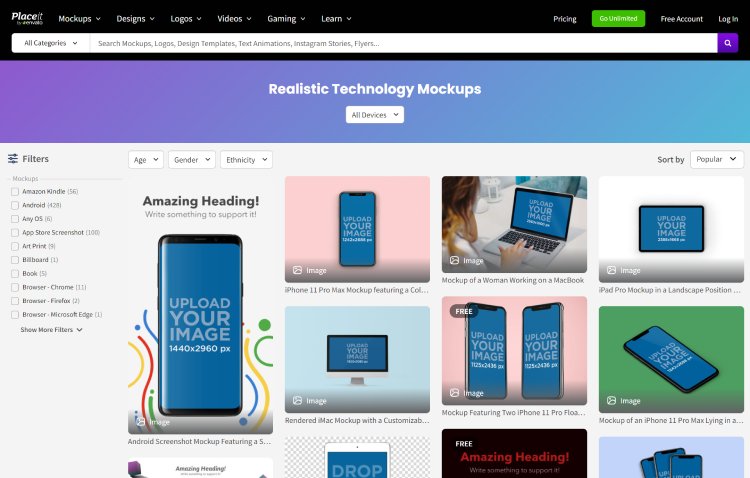
The first one is Placeit, which can be considered the best website for mockups. It is free to use. It’s a design tool where you can create mockups for brand logos, videos, games, and websites. Placeit, owned by Envato, holds one of the largest collections of pre-made mockup templates where you can add your design and customize it to your liking.
On Placeit, you can create mockups for clothes, Android apps, iOS apps, Android, MacBook, posters, banners, books, magazines, Facebook ads, business cards, and customizable prints on coffee mugs, phone covers, etc. The free tier lets you try the editor, but exports carry a watermark. For unlimited watermark-free downloads with a commercial license, you need the paid Unlimited subscription. Placeit runs frequent promotional pricing that changes often, so rather than quote a figure that goes stale, check the live rate on their pricing page before you sign up.
2. MediaModifier

Mediamodifier creates realistic mockups of products, such as digital devices, clothing, packaging, and posters. Users can upload their designs and place them on mockups to create realistic-looking images. Mediamodifier also allows users to download PSD templates of the mockups to design inside tools like Photoshop.
Mediamodifier runs on a subscription model. The Professional plan costs $25 per month, or $12.50 per month if you pay annually, and there is a Team plan at $45 per month for up to five members. The good part is the forever-free Starter plan, which gives you a set of free templates and the basic editor so you can try it before paying.
3. Mockuuups Studio

Another free website that can help you in creating mockups online for free is the Mockuuups Studio. The tool is not completely free. There is a free tier, but exports come watermarked and are limited to personal preview, not for commercial or client use. The Professional plan costs $15 per month, or $120 per year on annual billing. It needs very little effort to create mockups. You just choose a template, upload your design, and export. Mockuuups Studio also has a desktop app for macOS, Windows, and Linux alongside the browser editor.
This website allows you to create mockups for smartphones, tablets, laptops, TVs, desktops, and smartwatches. Unlike, other websites for free mockups, you can’t make mockups for clothes, banners, etc.
4. Mockey.ai

Mockey.ai is a popular mockup creator tool with almost the same consumer base as the earlier-mentioned website. The specialty of this tool is that it offers a range of features along with AI Support with enhanced design suggestions that end up creating more visually appealing and effective mockups.
Clothes, smartphones, advertisement designs, and various accessories mockups can be created here. On the website, you will just have to upload your design and then create mockups.
Mockey.ai has a generous free plan that lets you create and download mockups without watermarks, but it caps you at 3 downloads per day in JPG format, and the free exports are not licensed for commercial use. Paid plans start from $7 per month if you need more.
5. Shotsnapp

Shotsnapp is another free mockup generator that allows you to check your product/app/website on different devices like smartphones, smartwatches, tablets, laptops, etc. These mockups allow you to showcase your designs on other devices, making it easy to create a consistent visual representation of your brand across different platforms.
You can use Shotsnapp for free which allows you to add only one object per canvas, free templates, and export to JPG and PNG. You can also upgrade to PRO for $48 per year, which unlocks unlimited objects per canvas, unlimited templates, and PNG export alongside JPG. One thing worth noting is that Shotsnapp does not currently support downloading the final image on Safari or Microsoft Edge, so use Chrome or Firefox.
6. MockupsJar

MockupsJar allows you to create professional-looking mockups for your project. Whether it’s a book cover, mobile app design, website layout, or t-shirt graphic. MockupJar’s user-friendly platform allows you to upload your image, select your desired resolution, and generate a stunning 3D mockup in just a few clicks.
The best part about MockupsJar is that the mockup generator is completely free for regular users, with unlimited downloads and watermark-free images. There is a separate API plan at €45 per month for developers who want to integrate MockupsJar into their own applications, but you do not need that for creating mockups on the website.
7. Graphic Burger

GraphicBurger is one of the best websites for downloading high-quality free PSD mockup templates. Apart from the Mockups, the website offers a lot of other design features. Including, T-shirts, coffee mugs, mobile, water bottles, packaging, stamps, magazines, etc categories are available to create mockups.
The Graphic Burger is completely free to use. However, it doesn’t let you edit the mockups online from its website. First, you will have to download the PSD mockup templates and then will have to edit them using external tools like Photoshop or any other that supports editing PSD files.
8. PhotoFunia

PhotoFunia is a completely free mockup creator on the Internet. From porters, cards, and frames to magazines and book covers, PhotoFunia has over 600 HD-quality mockup effects to do some creativity with your photos.
On this website, I was not able to find enough mockups for a variety of devices and smartwatches. But, if you like to make your photos look amazing and want to see them on a big frame, wall, or magazine, PhotoFunia can be a great online platform for you.
Last Few Words
Overall, for those who are hunting for the best websites to create free mockups online, the above-mentioned tools are the ultimate time and money savers. As described above, most of these tools allow you to edit mockups right from their websites and only a few of them let you download PSD templates to edit them using tools like Photoshop.
While all the above-listed mockup generators work well for beginners, and some scale up nicely for professionals too, I personally like and use Placeit and MediaModifier for their browser-based editing and PSD template downloads, Mockey.ai for quick free mockups, and MockupsJar for its completely free unlimited downloads.
Frequently Asked Questions
What is a mockup generator?
A mockup generator is an online tool that lets you place your design onto a realistic product template, like a phone screen, t-shirt, book cover, or packaging, so you can see how the final product would look without producing it.
Which is the best free mockup generator?
It depends on what you need. For a genuinely free option with no watermark and no download limits, MockupsJar and GraphicBurger are the strongest picks. Mockey.ai also offers free watermark-free downloads but caps you at 3 per day. Placeit has the largest library, but most of its exports need a paid plan.
Can I use free mockups for commercial purposes?
Not always. Mockey.ai restricts commercial use on its free plan, and Mockuuups Studio limits free exports to personal preview only. MockupsJar and GraphicBurger do allow free commercial use. Always check the license terms of the specific tool before using a mockup in paid or client work.
Do I need Photoshop to create mockups?
No. Most mockup generators on this list let you edit and export directly from your browser. The exception is GraphicBurger, which provides PSD files you need to open in Photoshop or a compatible editor like Photopea.